Introduction
API Playground
Download the Data
Scrape the Data
Scraper
We are only scraping publically available pages (Pages not requiring authentication). Avoid hammering the data sources with requests and consider using the data that has already been scraped.
Tool to scrape data and distill it.
Prerequisites
- Have NodeJS, pnpm, and Git installed.
- Clone the FNTU repository. Run
git clone git@github.com:Acrylic125/fntu.gitthencd scraperandpnpm i.
Running the Scraper
Once cloned, run the following commands to start scraping:
pnpm run start courses
pnpm run start locations
pnpm run start exams
The code can be found here.
High level overview
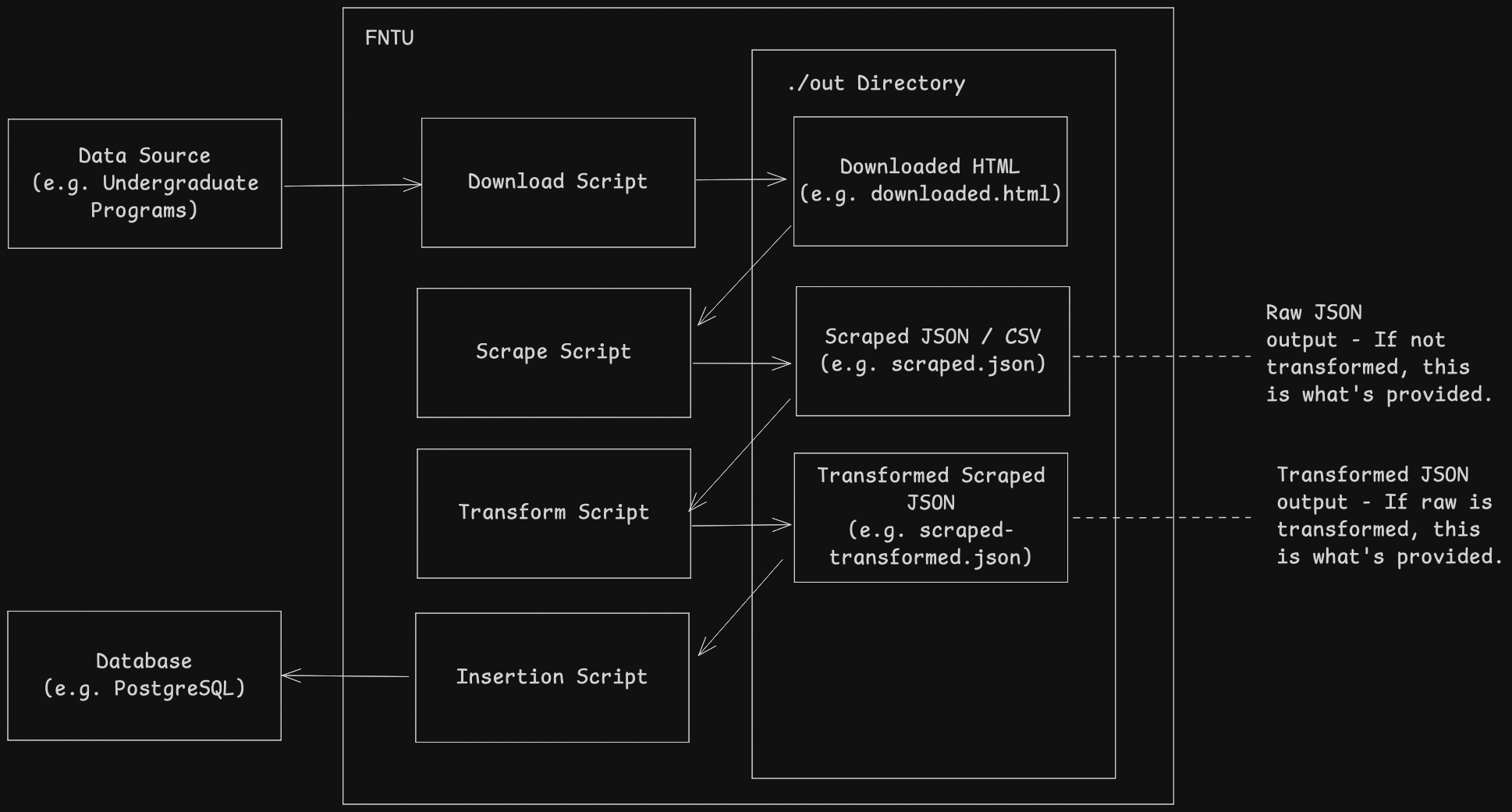
- Source the data we want to scrape. See Data Sources for more details.
- Download the pages (i.e. Data Sources).
- Scrape the data from the pages, and consolidate it. (In JSON format)
- (Optional) Transform the data, and consolidate it. (In JSON format)
- (Optional) Insert the data into a database. (Using Drizzle ORM)
You may modify any of these steps to fit your needs.
Scraping can lead to incosnsitent results as we do not own the pages we scrape from. The steps are broken into individual scripts to easily tell which step failed.
Data Sources
Data sources are the pages we want to scrape from.
Use | Data Sources | |||
|---|---|---|---|---|
Courses | ||||
Locations | NTU map uses maze map. We can source all locations by first retrieving all campuses. Using the campus ids, we can retrieve all locations for each campus. Do note the query param, We have to link the names used in undergraduate programsto the names used in MapIndoors. Thus, we add Altername Names (altNames) to each location. We source | |||
Exams |
| |||
Tips for Scraping
- Try to find relevant pages to scrape from.
- Go into Inspect Element, typically under Inspector tab, download the HTML and see what data is given. Use GenAI to help you extract the data you need.
- Go into Inspect Element, typically under Network tab, see what requests are made to the server.