Introduction
API Playground
Download the Data
Scrape the Data
Hosting the Playground
There are 2 ways to host the playground:
- Cloudflare Workers (Recommended for general prortotyping / production)
- NodeJS (Recommended for beginners) (COMING SOON)
We deployed API Playground on Cloudflare Workers.
Prerequisites
- Have NodeJS, pnpm, and Git installed.
- Load the data into a PostgreSQL database. Read More
- Clone the FNTU repository. Run
git clone git@github.com:Acrylic125/fntu.gitthencd apiandpnpm i.
Once cloned,
- Copy
.env.exampleand name it.env. Configure it based on the instructions in.env. - Run
pnpm devto run a local dev environment.
Cloudflare Workers
Additional Prerequisites
- Have a Cloudflare account.
Architecture
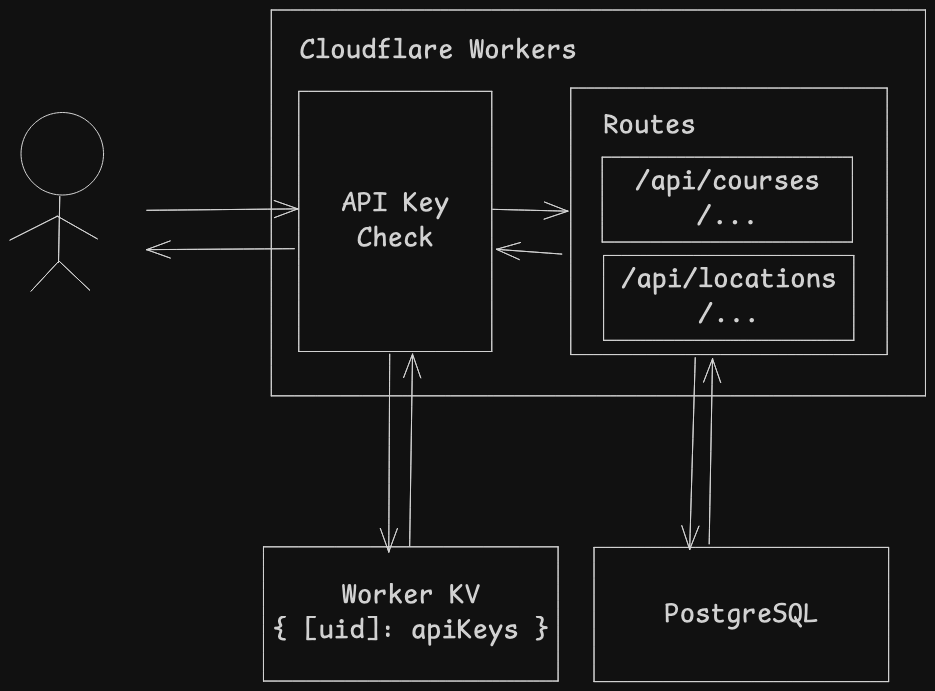 The project uses:
- Cloudflare Workers to host/run the API.
- Worker KV to store user generated API Keys.
- PostgreSQL (Any PostgreSQL provider works)
Steps
Run the following commands:
# Create KV namespace, fntu_api_kv
npx wrangler kv namespace create fntu_api_kv

# Add database URL secret. Paste in the DB URL.
npx wrangler secret put DATABASE_URL

# Add API Key Secret for signing API Keys
# 1. Generate a secret. Use a different secret than the one you used for .env.
openssl rand -hex 32
# 2. Add API KEY SECRET. Paste the generated string from (1).
npx wrangler secret put API_KEY_JWT_SECRET
To test the deployment, run pnpm dev.
To deploy, run pnpm run deploy.